Case Study

EZFilesConverter

A self-service file conversion platform built around category discovery, guided processing, and instant output delivery

  1. 5 Converter Families — Images, Audio, Video, Spreadsheets, and Documents are surfaced from one discovery layer.
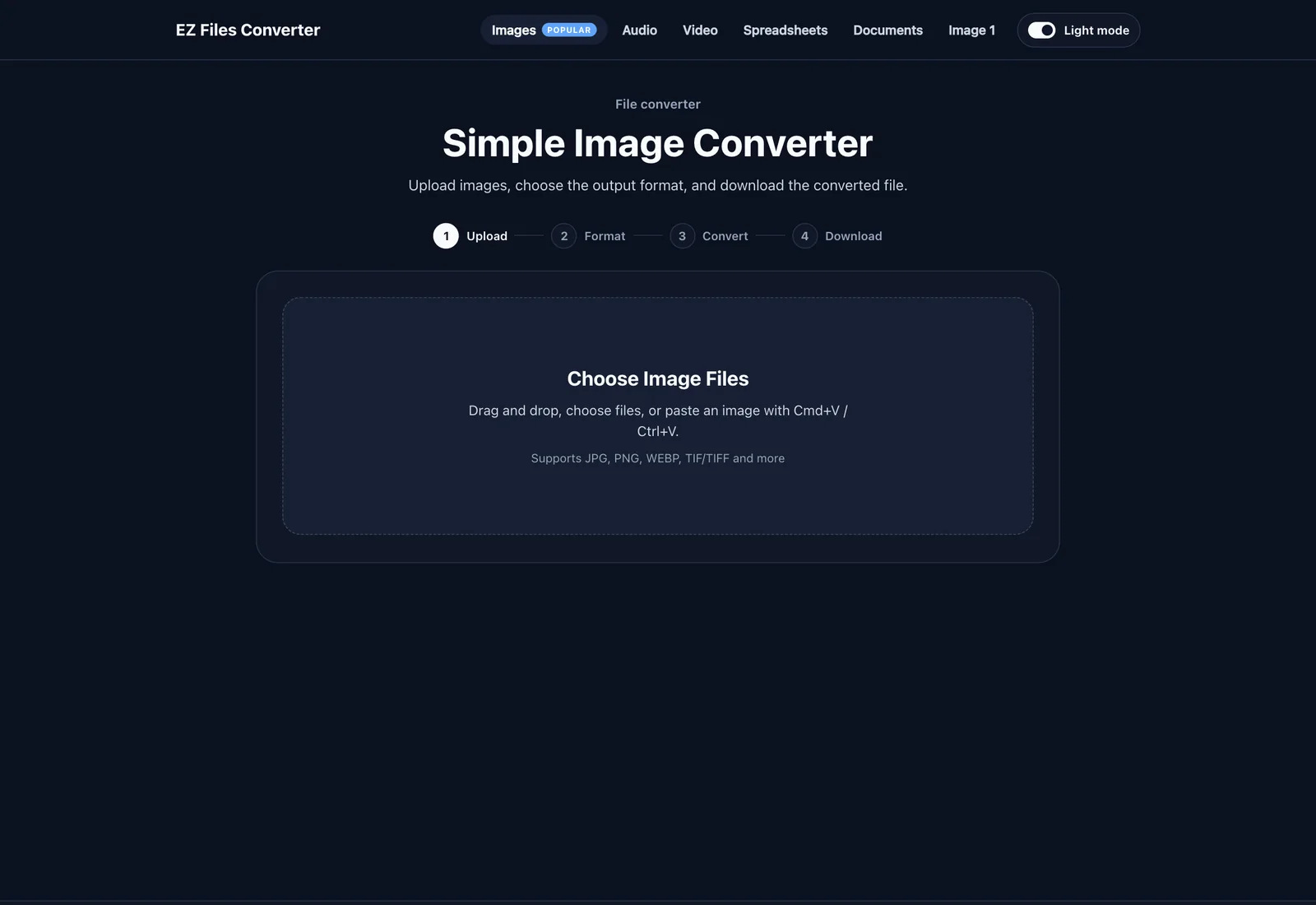
  2. 4 Guided Steps — Every converter follows the same Upload, Format, Convert, Download journey.
  3. 6 Active Modules — The current live surface covers image, audio, video, document, and spreadsheet flows.

Platform

Tool families and roadmap

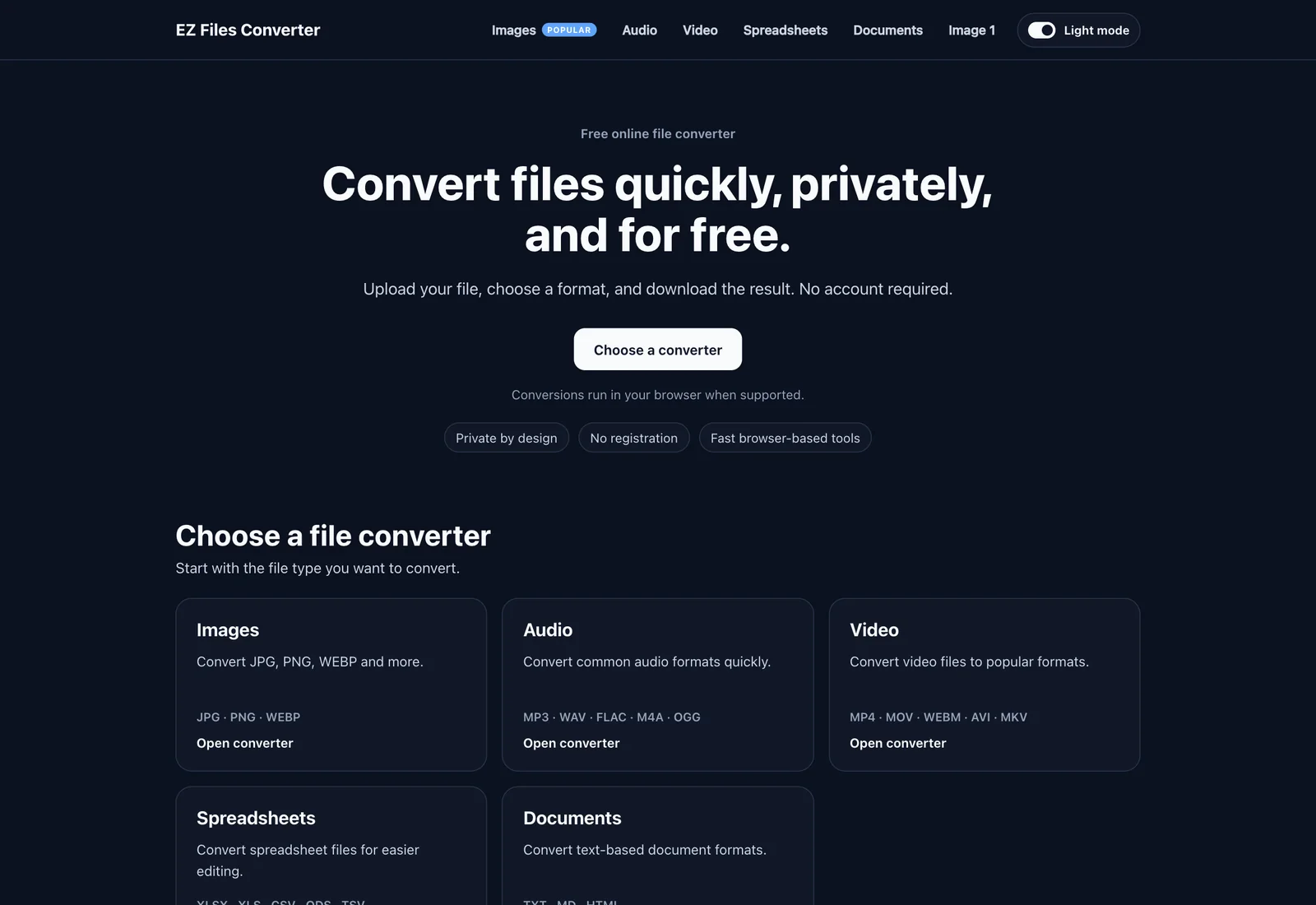
EZ Files Converter is a multi-category product with a central homepage, shared navigation, category landing pages, and dedicated tool workspaces that keep the upload-to-download journey consistent across the platform.

Tool family

Images

The image family combines direct format conversion with a more advanced bulk WEBP workflow.

Active tools

  • Simple image converter for PNG, JPEG, JPG, and WEBP
  • Bulk Image to WEBP converter with square output and padding options

Roadmap

  • Image resize
  • Image compress
  • Image crop
  • Background removal

Tool family

Audio

Audio tools focus on quick one-file conversion with familiar output targets and room for future editing utilities.

Active tools

  • Audio converter for MP3, WAV, M4A, FLAC, OGG, AAC, WMA, and AC3

Roadmap

  • MP4 to MP3
  • Audio trim
  • Volume booster
  • Audio merger
  • Voice recorder

Tool family

Video

Video conversion mirrors the same workflow pattern while preparing the product for download and editing utilities.

Active tools

  • Video converter for MP4, AVI, MOV, MKV, WEBM, FLV, WMV, and MPEG

Roadmap

  • YouTube downloader
  • Instagram downloader
  • TikTok downloader
  • Video trim
  • Video compress
  • Video to GIF

Tool family

Documents

Document conversion is active today and already positioned inside a broader PDF utility roadmap.

Active tools

  • Document converter between TXT, Markdown, and HTML

Roadmap

  • PDF to Word
  • Word to PDF
  • PDF merge
  • PDF split
  • PDF compress
  • Image to PDF

Tool family

Spreadsheets

Spreadsheet workflows already exist in the product surface even though the live conversion engine is still a placeholder.

Active tools

  • Spreadsheet upload-format-download flow for XLSX, XLS, CSV, ODS, XLSM, NUMBERS, TSV, and ET

Roadmap

  • Excel to CSV utilities
  • Spreadsheet-specific transformation tools

Workflow

One guided flow for every tool

Step 01

Upload files

Users enter the workflow by uploading one file, multiple files, or full folders depending on the selected converter.

Step 02

Choose target format

Each tool exposes the valid output formats for that workflow so users can define the result before processing begins.

Step 03

Run conversion

The conversion engine validates the input, processes the file, and surfaces progress or error states inside the guided workspace.

Step 04

Download result

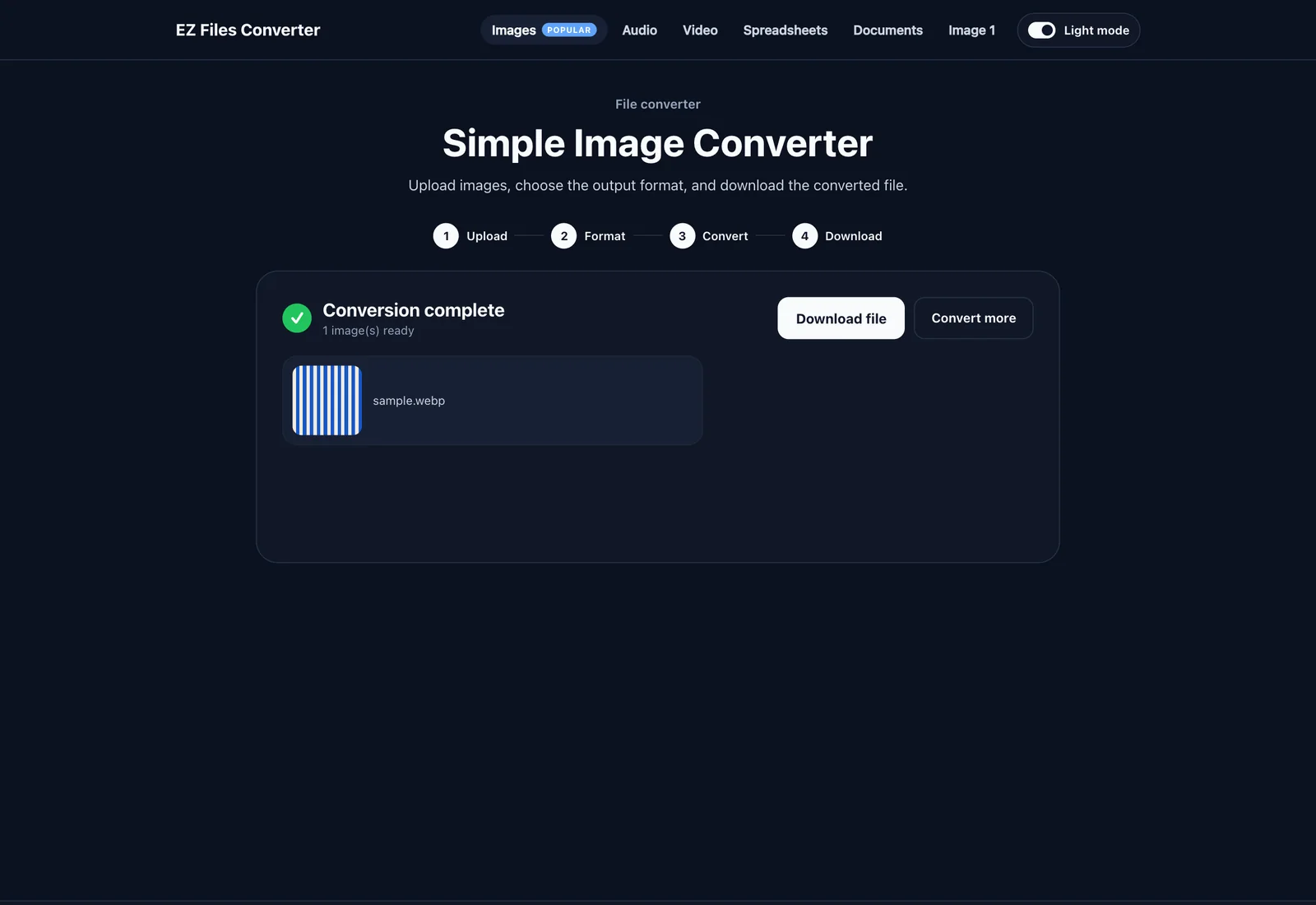
Users receive the output as a direct download or ZIP archive, with reset and repeat-conversion actions ready for the next task.

Active modules

What users can do today

Active module

Homepage and Category Discovery

The product is organized as a multi-category converter suite with a homepage and converter-family navigation.

  • Surface Images, Audio, Video, Spreadsheets, and Documents from a central discovery layer
  • Use shared header and footer navigation to move between converter families
  • Support category landing pages and dedicated tool pages within one consistent product structure

Active module

Guided Conversion Workspace

Each tool follows the same Upload, Format, Convert, Download flow to keep the experience easy to learn.

  • Guide users through a clear four-step process instead of exposing a raw technical workflow
  • Validate files before conversion begins so invalid inputs fail early
  • Return users to download and reset actions without forcing them to restart the journey manually

Active module

Image Conversion Suite

Image tools cover both simple format conversion and a more specialized bulk WEBP workflow.

  • Convert PNG, JPEG, JPG, and WEBP with quality control for lossy formats
  • Accept multiple images or full folders for bulk WEBP conversion
  • Support square output, padding behavior, transparency rules, preserved folder structure, and ZIP delivery

Active module

Audio and Video Conversion

Media tools give users direct access to common output formats while keeping the interface consistent.

  • Audio conversion covers MP3, WAV, M4A, FLAC, OGG, AAC, WMA, and AC3
  • Video conversion covers MP4, AVI, MOV, MKV, WEBM, FLV, WMV, and MPEG
  • Users follow the same upload-to-download flow across media tools instead of learning separate UIs

Active module

Documents and Spreadsheet Tools

Text document conversion is active today, while spreadsheet flows are already positioned inside the product.

  • Convert TXT, Markdown, and HTML with basic formatting transformation
  • Expose spreadsheet workflows for XLSX, XLS, CSV, ODS, XLSM, NUMBERS, TSV, and ET
  • Keep spreadsheet tooling visible in the suite while deeper conversion logic remains on the roadmap

Active module

Progress, Error States, and Repeat Use

The platform includes the product states needed for real self-service usage, not just the conversion action itself.

  • Show visible progress, processing state, and error messaging during conversion
  • Present success state, download actions, and reset flow for the next task
  • Support direct downloads for single outputs and ZIP packages for batch image results

Screens

Key screens

Homepage and converter families

Discovery

Homepage and converter families

The homepage or category landing view that helps users choose between image, audio, video, spreadsheet, and document tools.

Upload to download workspace

Workflow

Upload to download workspace

The core four-step interface covering upload, target format selection, conversion, and result delivery.

Progress, success, and repeat conversion states

Output

Progress, success, and repeat conversion states

The processing view that shows progress feedback, download actions, reset, and repeat-conversion flow.

Next step

Have a similar workflow? Let's map it.

Tell us where the process gets stuck. Nick replies with a scope outline and a price range.

Send one message. Get a plan back.

No newsletters. Your details are used only to reply to you.